Replace your background in Google Meet
What’s changing
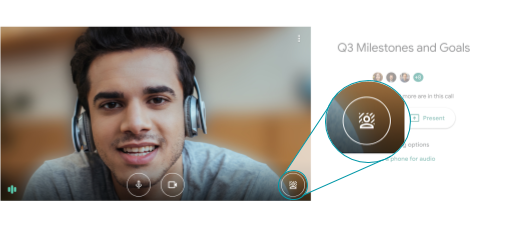
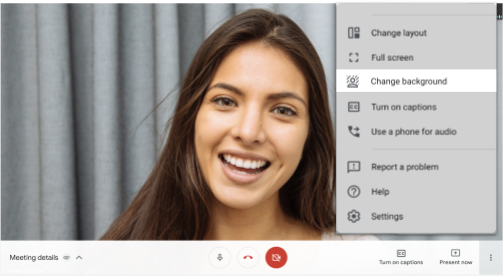
You can now replace your background with an image in Google Meet. You can either use Google’s hand-picked images, which include office spaces, landscapes, or abstract backgrounds.
IMPORTANT NOTES FROM IU STAFF:
- The ability to upload your own images is not available for Immaculata University users at this time.

Who’s impacted
IU students, faculty, and staff.
Why you’d use it
Custom backgrounds can help you show more of your personality, as well as help hide your surroundings and offer greater privacy.
Important Notes From IU Staff
Caution About System Performance After Background Changes
- The ability to change the background works by "drawing" an image of you into a canvas HTML element, and overlaying it on top of the background image. This is done for each frame of the video (e.g., up to 30fps). As you might imagine, the ability to render a facsimile of your image at dozens of millions of pixels per second takes tremendous processing power. If you feel that your computer is acting sluggish after enabling the custom background, you might want to try to disable it for a few minutes and see if it improves your system's performance.
- Similarly, the ability to upload the rendered image of you with the custom background results in significantly larger amounts of data that needs to be uploaded to Google's servers. Additionally, if all of the participants
enables this feature and you are showing each of their images (e.g., via Tile View), then this would likewise impact your Internet connection's download speeds.
- To check on the quality of your bandwidth connection, please use the Speedtest Tool within Moodle. Unlike other similar web applications, the Speedtest Tool found in Moodle tests your connection directly against Google's servers, which will provide a more accurate reflection of your experiences during Google Meet sessions.
Additional details
Google also recently launched the ability to filter out disruptive background noise and blur your background in Google Meet. Together, these features reduce audio and visual distractions, and help ensure more productive meetings.
Virtual backgrounds work directly within your browser and do not require an extension or any additional software. At launch, they’ll work on ChromeOS and on the Chrome browser on Windows and Mac desktop devices. Support on Meet mobile
apps will be coming soon; we’ll announce on the Google Workspace Updates blog when they become available.
Getting started
This feature is OFF by default. Visit the Google Help Center to learn more about how to
change your background on Google Meet
.
Rollout pace
- Rapid Release domains: Gradual rollout to eligible devices (up to 7 days for feature visibility) starting on October 30, 2020
- Scheduled Release domains: Gradual rollout to eligible devices (up to 7 days for feature visibility) starting on November 6, 2020
Availability
- Available to Workspace Essentials, Business Starter, Business Standard, Business Plus, Enterprise Essentials, Enterprise Standard, and Enterprise Plus, as well as G Suite Basic, Business, Education, Enterprise for Education, and Nonprofits customers
- Available to users with personal Google accounts
- Selecting your own picture is not available to participants of meetings organized by Education and Enterprise for Education customers
Resources
Roadmap
- This feature was listed as an upcoming release.